Bening Script: A Modern Script Font for Crafters and Makers
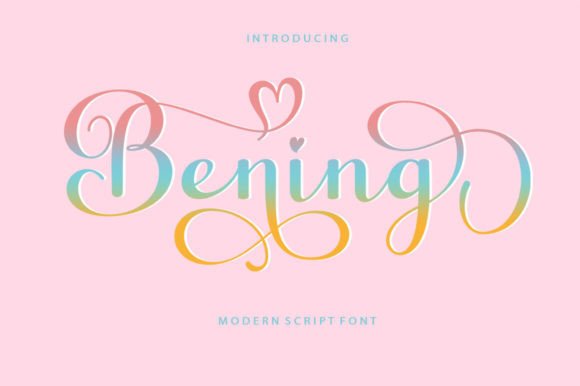
As a crafter and small shop owner, I’m always on the lookout for fonts that bring both charm and commercial viability to my products. That’s why I was excited to discover Bening Script. This modern script font has an irregular baseline that adds a touch of whimsy while maintaining readability. It’s the kind of typeface that feels both fresh and timeless—perfect for makers who want to elevate their designs without sacrificing practicality.
Why Bening Script Stands Out
Bening Script isn’t your average script font. Its irregular baseline gives it a hand-drawn quality that feels personal and authentic. The style is undeniably feminine and trendy, but not overly delicate, which makes it versatile for a wide range of uses. Whether you're creating a logo for your boutique or designing a sticker for a planner, this font brings a unique visual personality that sets your work apart.
What really makes Bening Script shine is how it walks the line between decorative and functional. It’s expressive enough to catch the eye but clean enough to use in commercial settings where clarity matters. I’ve used it on greeting cards, product tags, and SVG designs, and each time it delivered a polished, handmade look without any fuss.
Perfect for Wedding and Event Stationery
If you design wedding invitations or event signage, Bening Script should be in your toolkit. The font’s elegant curves and flowing lines make it ideal for names, titles, and short phrases that need to feel special. I recently used it on a set of “Thank You” cards for a bridal shower, and the feedback was overwhelmingly positive. People loved how it looked both modern and heartfelt.
It also works beautifully on welcome boards, seating charts, and directional signs. Since the font is designed for display use, it holds up well when scaled larger, making it perfect for printed signage or digital mockups. Just keep in mind that its decorative nature makes it better suited for headlines and accents rather than long blocks of text.
Great for Product Labels and Packaging
For small product makers, especially those selling candles, soaps, or handmade foods, Bening Script can help your packaging stand out. It has a clean, upscale feel that elevates even the simplest label design. I’ve used it on candle jars and boutique tags, and each time, it gave the product a more premium look.
One tip when using Bening Script for small labels or stickers: make sure you check the spacing and weight at smaller sizes. While it’s generally readable, it’s best used for short phrases or names rather than detailed descriptions. For that reason, I often pair it with a clean sans serif font for secondary text, which keeps the design balanced and professional.
Pairing Bening Script with Other Fonts
Font pairing is key when you're creating layered designs or multi-text elements. Bening Script pairs beautifully with modern sans serif fonts like Montserrat or Lato. These combinations keep the overall look contemporary while letting Bening Script take center stage as the decorative highlight.
If you're going for a more rustic or vintage feel, try pairing it with a soft serif font like Cinzel or Playfair Display. This works especially well for farmhouse signs, seasonal cards, or printable wall art where you want a touch of elegance without being too formal. The contrast between the flowing script and the structured serif creates a visually pleasing balance that customers respond to.
Using Bening Script in Digital and Printable Designs
As a printable product creator, I rely on fonts that look great on screen and in print. Bening Script delivers on both fronts. It’s ideal for digital downloads like planner pages, quote posters, and social media graphics. The font’s clean outlines and distinct character shapes ensure it remains legible even after being resized or printed on different paper types.
One of my favorite uses is in holiday-themed printables. I created a set of Christmas tags using Bening Script for the names and a simple serif font for the “To/From” line. The result was festive, elegant, and easy to read. Since Bening Script includes alternates and ligatures, I was able to customize the look slightly for each tag, giving them a more personalized feel.
Practical Tips for Using Bening Script
When working with Bening Script on cutting machines like Cricut or Silhouette, always do a test cut or print before committing to your final material. The font’s slight irregularity can affect how cleanly it cuts, especially in intricate letters like “g” or “y.” Adjusting the size or spacing slightly can make a big difference in how the text reads once applied to your project.
Also, be sure to check the font’s included styles and character sets. Bening Script supports multilingual characters, which is a huge plus if you sell to an international audience or create products in multiple languages. The font files typically come in both OTF and TTF formats, making them compatible with most design software and cutting machines.
Commercial Use and Licensing
One of the biggest concerns for small business owners and printable creators is licensing. The good news is that Bening Script is a commercial font, which means you can use it in physical products, digital downloads, and client work without legal worries. Always double-check the specific license terms that come with your purchase to ensure you’re using it within the allowed scope, especially for large-scale production or resale.
Final Thoughts
Bening Script is more than just another script font—it’s a practical design asset that brings both beauty and usability to your creative work. Whether you're crafting invitations, designing product packaging, or making digital printables, this font adds a touch of modern elegance that customers appreciate. It’s versatile, readable at appropriate sizes, and easy to pair with other fonts for a cohesive design language.
If you’re looking to refresh your font collection with something that feels both current and classic, give Bening Script a try. It’s the kind of typeface that helps your handmade and small business projects stand out—without complicating your workflow.